$
Spendy

Your money,
written down.

Tap the amount, pick a category, done. Four seconds an entry — which is the only reason anyone keeps doing it past the first week.

See what it costs How your data is handled
iPhone · iOS 17 and later · no account, no sign-in
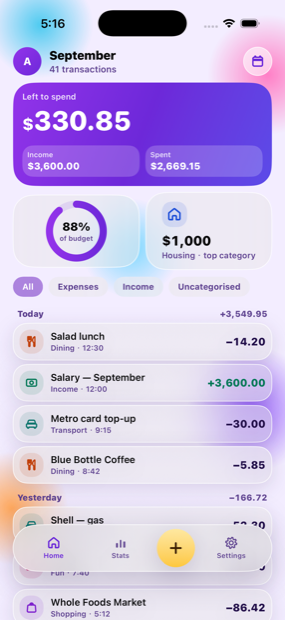
Spendy home screen showing this month's spending Spendy insights screen

Nothing ever leaves your iPhone

This is the part most money apps get wrong, so it is worth being specific about.

No network, at all

Spendy makes no network requests. Turn on Airplane Mode and every feature still works, because none of them needed the internet.

No account, ever

No sign-up, no email, no password. Open the app and start logging. There is nothing to forget and nothing to leak.

Your ledger stays local

Every entry lives in a single file on your phone. Export it to CSV any time; delete the app and it is gone with it.

Everything you need, nothing you don't

Free for 3 days, then $2.99 a month. Your existing entries stay readable and exportable either way.

  • Add expenses and income by hand in a couple of taps
  • 14 categories out of the box, or make your own
  • A monthly budget with a live “left to spend” figure
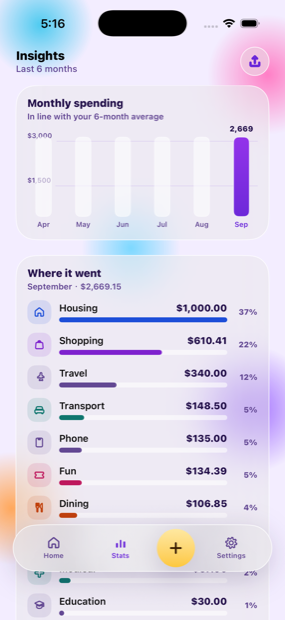
  • Charts by category and by day
  • 12 currencies
  • Export everything to CSV whenever you like
Spendy insights: monthly spending and category breakdown
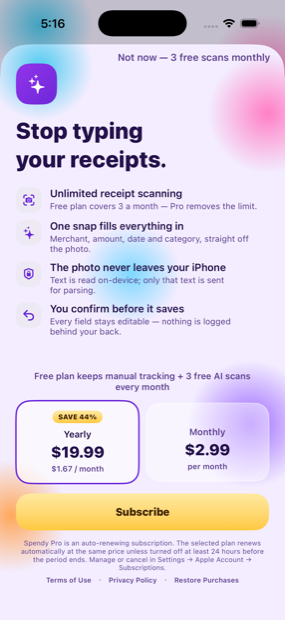
Spendy Pro subscription screen

Spendy Pro

Spendy is free to try for 3 days. After that a subscription keeps it going. Cancel at least 24 hours before the trial ends and you are not charged.

SAVE 44%
$19.99
per year · $1.67 / month
$2.99
per month

Billed through your Apple Account. Renews automatically at the same price unless auto-renew is switched off at least 24 hours before the period ends. Cancel any time in Settings → Apple Account → Subscriptions.